Gallery
MPC running on real hardware, from the scripts under
examples/real_mpc/. The state comes from the
robot instead of a simulator, SSQP re-solves a short horizon at every control step, and the first control is sent
back to the motors. The README there describes each example, the parameters it takes, and the precautions to take
before running it on your own robot.
Pendubot Swing-Up
The pendubot, a double pendulum with only its shoulder joint actuated, swinging up and balancing on real hardware.
Produced by pendubot.py, the MPC server, together with
hardware.py, the client that reads the motors and applies the torques. The two
exchange the state and the controls over a socket, which is how the MPC can run on a different machine from the one
connected to the motors. This is the real counterpart of the simulated
pendubot swing-up.
Acrobot Swing-Up
The acrobot, the same double pendulum with only its elbow joint actuated instead, swinging up and balancing. Produced
by acrobot.py, run with the same hardware.py client. Having the actuator at the
elbow makes swing-up harder than for the pendubot, and the cost also tracks the elbow's height to help it.
The Double Pendulum in the AI Olympics
Our solver was also used in the 4th AI Olympics, held in Bremen in August 2026, where we took first place. The competition's double pendulum task was run on Chalmers University's cloud pendulum platform: a real double pendulum that participants control remotely, with their controllers running on the computing resources the platform provides, rather than on their own hardware.
Taking part meant adapting the same pendulum MPC code shown above to that setting. The platform's computing resources are more limited than those of the machine we use with our own pendulums, so the problem had to be formulated in an easier form that could still be solved in real time, and then retuned for the platform's pendulum. The code also had to be adapted to the platform's API in place of our own hardware client. Beyond that, the solver itself was the same, which made the competition a test of how well SSQP holds up on a real system it was not originally tuned for, with tighter computing limits. The code for our submission is available at upatras-lar/2026_ai_olympics_underactuated_dp.
Panda Reaching a Target
A Franka Emika Panda moving its end effector to a target position, in two runs of the target task from
models.py, served by controller_server.py to the robot's
hardware.py client.
-
Unconstrained. The end effector goes to the target and holds it. When the robot is pushed, it recovers and returns to the target.
-
Constrained. The model bounds the end effector to a half space along one axis, and the target lies beyond that bound, so it cannot be reached. The end effector gets as close to the target as the constraint allows, and stays there. Pushes are recovered from as well, and this includes a push towards the target, into the disallowed region: once released, the end effector returns to the allowed side of the constraint.
The constraint is a plain bound added to the MPC problem, like the one in the simulated obstacle avoidance demo, so no part of the controller is specific to it. The robot tracks the MPC's joint references with a compliant joint-space controller.
Go2 Trot Across Terrain, in unitree_mujoco
The Go2 trotting over bars, a step, stairs, a slope and rough terrain, with the gamepad commanding its velocity. This is not the real robot, but a simulation, shown here as the step between the simulated Go2 walk and the real one.
What makes it different from the simulated walk. The simulated walk is synchronous: MuJoCo only advances after the controller has produced its control, so a slow solve just makes the simulation run slower, and the controller never experiences a delay. Here the simulator is unitree_mujoco, which runs as its own process, in its own time, and exchanges the robot's low-level state and joint commands with the controller through the same Unitree SDK interface the real Go2 uses. The controller therefore lives with what it will meet on the robot: state messages that arrive on their own schedule, a solve that takes real time, and a plan that is only applied some milliseconds after the state it was solved from was measured.
As such, this uses the real controller. Specifically, it is
go2_joystick.py, run with
--simulation, which differs from a run on the robot mainly in the network interface it binds to and in the joint
gains, set for the simulator. The whole-body walking MPC in
dynamic_walk_model.py
is unchanged, and so is everything around it that exists because of the real world:
-
The solver runs in its own thread at a fixed rate, and solves from a state predicted forward to when its plan will start, to make up for the latency.
-
The base position and velocity, which the robot does not measure, are estimated with a Kalman filter that fuses the accelerometer with the leg odometry of the stance feet.
-
The plan is played back between solves, with the joint torques recomputed from the measured state at every command.
-
Footholds and swing heights follow a terrain model, which is what lets the robot place its feet on the bars, up the step and the stairs, and across the slope and the rough patch, and keeps them away from edges. The terrain is mapped with the LIDAR, here a simulated one.
-
A fallback lowers the robot to the ground and damps the joints if the solver stalls, the state stops updating, or the joints stop following the plan.
Note that the map the simulated LIDAR produces is much better than what we get on the real robot: it is cleaner, more complete and free of the noise, gaps and pose errors of a real sensor. The terrain in this video is therefore easier for the controller than the real one will be, and the real map is the harder part of the sim to real gap that this demo leaves open.
Running the controller this way is the closest test possible without the robot: failures that depend on timing, such as a plan that arrives too late or a state estimate that drifts, show up here. It stays a simulation, though, so the actuators, the contacts and the sensors are still models of the real ones.
Go2 Trot
From here on, the videos are of the real Go2, running the same controller as in the simulation above: the whole-body
walking MPC of go2_joystick.py,
driven with a gamepad. The robot trots and turns, with the sticks commanding the forward, sideways and yaw velocity.
The base position and velocity it plans from are estimated on the robot from the leg odometry and the accelerometer,
and the plan is re-solved at 50 Hz on a computer connected to the robot.
The video also includes changing the base height, as well as the leg swing height, during the trot.
Go2 Jump
A sequence of jumps in place in between trots. The jump is part of the same MPC problem as the walk: the base follows a crouch, push off, flight and landing reference, and all four contact constraints are dropped for the flight stages, as in Go2 Jump, but scheduled at run time from a button press on the gamepad. The robot then steps its feet back under the hips after the landing and goes on trotting.
Go2 Walk
A slower walking gait, which lifts one foot at a time instead of a diagonal pair, so that three feet are on the ground at all times. It is one of the gaits the gamepad switches between while the robot stands, along with the trot, and it moves at a lower top speed than the trot.
Push Recovery
The Go2 being pushed, while trotting and while standing. Nothing in the controller is specific to pushes: the MPC re-solves from the measured state at every step, so a push shows up as a state error that the next plan corrects, by shifting the contact forces and stepping where the feet need to land to catch the base. While standing, a push that moves the base fast enough starts the robot stepping, so that its feet can catch it.
Go2 Trotting onto a Platform
The Go2 getting up on a platform and walking on it, in two runs. This is the real counterpart of the terrain in the unitree_mujoco video, and it is harder than it looks next to that video. On the real robot, the terrain comes from a LIDAR map that is noisier and less complete than the simulated one, and the base position estimate is not perfect, so the footholds and heights the robot plans for are less accurate than in simulation. Late or uneven touchdowns, which a simulation rarely produces, make this harder still. Because of these real world conditions, the platform is a much harder task for the robot than the same terrain in simulation.
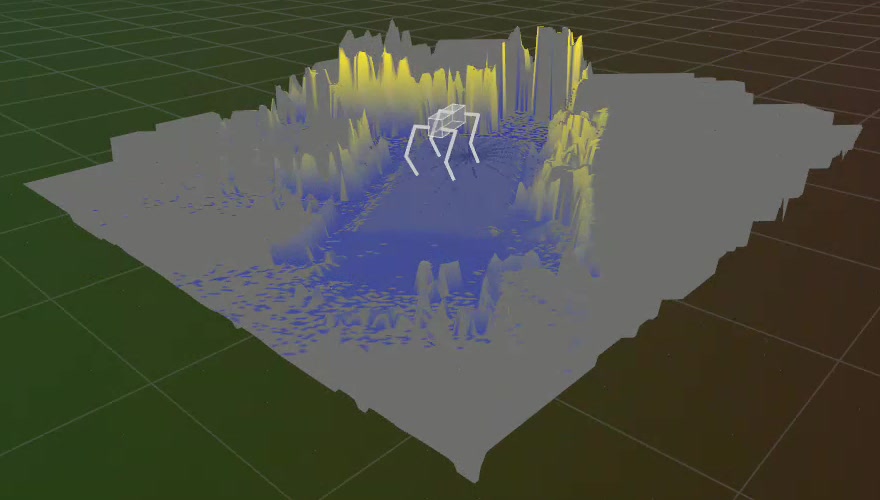
This is roughly what the map from the real robot's LIDAR looks like once it has been cleaned up for the solver to use. The robot stands in the middle, and the heights around it are shaded from low (blue) to high (yellow). Even after the cleanup, the map is far from the clean terrain of the simulation, with jagged edges, tall spikes and patchy ground. The footholds, swing heights and base heights the robot plans for come from this map, which is a large part of why the real platform is harder than the simulated terrain.